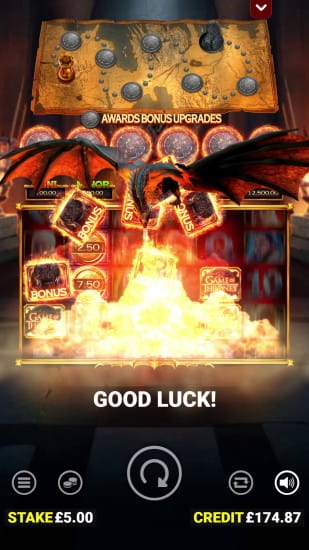
Game of Thrones: Seven Kingdoms by Blueprint Gaming is built in HTML5, which means the full game runs directly in your mobile browser without any dedicated download required. The Game of Thrones app experience on iOS and Android delivers the same 4,096 ways to win, all five house Collect features, Dragon Fire Modifiers, Iron Throne Spins, and the Seven Kingdoms Map progression that define the desktop version. Nothing is stripped out, and no features are limited to desktop only.
There is no standalone Game of Thrones slot app available as an independent download. The game is accessed through the apps and mobile platforms of the online casinos that carry Blueprint Gaming’s catalog. For players looking for the Game of Thrones app on Android or iOS, the practical route is downloading the casino app of your chosen operator — all the major casinos carrying the title have well-developed mobile platforms where the game loads quickly and plays smoothly on any modern smartphone or tablet.
This guide covers how to access Game of Thrones on Android and iOS, what the mobile experience looks like, which casino apps carry the title, and what to expect from playing on a smaller screen versus a desktop.
| Feature | Details |
|---|---|
| Game name | Game of Thrones: Seven Kingdoms |
| Developer | Blueprint Gaming |
| Standalone app | No — available via casino apps |
| Android access | Casino APK download or browser |
| iOS access | Casino App Store app or PWA |
| Mobile technology | HTML5 — no download required |
| Full feature parity | Yes — all features available on mobile |
| RTP | 92% / 93% / 94% (operator dependent) |
| Max win | 17,000x stake |
| Volatility | High (4/5) |
Game of Thrones Slot on Android
Android is the most flexible platform for accessing casino apps, and Game of Thrones runs without any issues on modern Android devices. Since Blueprint Gaming’s title is available through casino platforms rather than as a standalone app, Android users have two options — playing directly in the mobile browser or downloading the casino’s dedicated Android app. Both deliver the full game experience, including all bonus features and the Seven Kingdoms Map progression.
Most major casinos carrying the Game of Thrones slot offer a dedicated Android app downloadable directly from their website. Google Play Store restrictions on real money gambling apps mean these APK files are distributed via the casino’s own site rather than through the Play Store — a standard practice for licensed casino operators and a straightforward process for Android users.
How to Download the Game of Thrones App on Android
- Visit the official website of your chosen casino on your Android device
- Navigate to the mobile or app section — usually found in the footer or main menu
- Tap the Android download link to download the casino APK file
- Before installing, open your device Settings and navigate to Security or Privacy
- Enable Install from unknown sources or Install unknown apps for your browser
- Open the downloaded APK file from your notifications or downloads folder
- Tap Install and wait for the installation to complete
- Open the casino app, log in or register your account
- Search for Game of Thrones in the lobby and start playing
If you prefer not to install anything, simply open your mobile browser, navigate to the casino website, and play directly — the browser version loads the full game without any additional steps.
Android System Requirements
Game of Thrones is a well-optimized HTML5 title and runs smoothly on the vast majority of Android smartphones released in the last four to five years. The game’s visual complexity — particularly during Dragon Fire Modifiers and Iron Throne Spins — benefits from a reasonably capable device, but the requirements are not demanding by modern standards.
| Requirement | Minimum recommended |
|---|---|
| Android version | Android 7.0 or higher |
| RAM | 2 GB minimum, 3 GB recommended |
| Storage | 100 MB free (for casino app) |
| Browser | Chrome 80+ or equivalent |
| Internet connection | 3G minimum, 4G/WiFi recommended |
| Processor | Quad-core 1.4 GHz or higher |
| Screen resolution | 720p or higher |
For the best experience during feature-heavy sequences like Iron Throne Spins — where multiple Collect modifiers, multipliers, and the map progression interface are active simultaneously — a stable 4G or WiFi connection makes a noticeable difference in animation smoothness. Closing background apps before a session also helps on devices at the lower end of the RAM range.
Game of Thrones Slot on iOS
iPhone and iPad users can access Game of Thrones: Seven Kingdoms through two routes — the casino’s native iOS app, where available via the App Store, or a Progressive Web App (PWA) added directly to the home screen from Safari. Apple’s App Store policies around real money gambling apps are stricter than Google Play, meaning not every casino that carries the Game of Thrones slot has a native iOS app available in every region. However, the browser-based experience on iOS is excellent — Safari handles HTML5 casino games extremely well, and the full feature set, including Dragon Fire Modifiers, Iron Throne Spins, and the Seven Kingdoms Map, runs without any compromise on modern iPhones and iPads.
The PWA option is particularly well-suited to iOS for this title. Adding the casino to your home screen via Safari creates an app-like shortcut that opens full screen without a browser bar — a cleaner experience than standard browser play and functionally identical to a native app for most players.
How to Install the Game of Thrones App on iOS
- Open Safari on your iPhone or iPad — PWA installation only works through Safari, not Chrome or other iOS browsers
- Navigate to the website of your chosen casino carrying Game of Thrones
- If the casino has a native App Store app, find the download link on their site or search directly in the App Store
- For PWA installation, tap the Share button at the bottom of the Safari toolbar — the square icon with an arrow pointing upward
- Scroll through the share menu and tap Add to Home Screen
- Give the shortcut a name or leave the default and tap Add in the top right corner
- The casino icon now appears on your home screen — tap it to open in full-screen mode
- Log in to your existing account or register if you are a new player
- Find Game of Thrones in the casino lobby and start playing
iOS System Requirements
Apple devices are well optimized by default, and Game of Thrones performs smoothly across the iPhone and iPad range from the last several years. Keeping iOS updated ensures the best compatibility with modern HTML5 game engines — older iOS versions can occasionally produce rendering issues with feature-heavy slots.
| Requirement | Minimum recommended |
|---|---|
| iOS version | iOS 13.0 or higher |
| Compatible devices | iPhone 6s or later, iPad 5th gen or later |
| Storage | Minimal — no download required for PWA |
| Browser | Safari 13+ |
| Internet connection | 3G minimum, 4G/WiFi recommended |
| RAM | 2 GB minimum |
| Screen resolution | 750 x 1334px or higher |
The Iron Throne Spins feature, with fully unlocked house Collects and active multipliers, is one of the more visually intensive sequences in the game. On iPhone XS and later, the experience is seamless — on older supported devices, a WiFi connection rather than mobile data is worth prioritizing for feature rounds specifically to avoid any frame rate variation during the most complex bonus states.
Benefits of Playing Game of Thrones on Mobile
Playing Game of Thrones: Seven Kingdoms through a casino app rather than a desktop browser has a number of practical advantages — particularly for a game with a long-term progression mechanic like the Seven Kingdoms Map. Here is what the app experience adds over desktop play.
- Persistent map progression on the go. The Seven Kingdoms Map carries over from session to session at real-money casinos. Having the casino app installed on your phone means you can advance your map progress in short sessions throughout the day — on a commute, during a break, anywhere — rather than being tied to a desktop session. For a game specifically designed to reward consistent returning play, this is a meaningful practical advantage.
- Faster access to the game. With the casino app installed on your home screen, you are one tap away from Game of Thrones rather than navigating through a browser. For a slot where short sessions have genuine strategic value — advancing the map, triggering a bonus from an improved map state — lower friction access means you are more likely to actually play the short sessions that build toward the stronger bonus triggers.
- Push notifications for promotions. Casino apps deliver push notifications about bonuses, free spins, and promotions directly to your lock screen. Blueprint-branded slots like Game of Thrones frequently attract dedicated promotional campaigns at casinos — cashback offers, free spin packages and tournament entries tied to specific titles. Being notified immediately when these go live means you can activate them before they expire.
- Biometric login. Most casino apps on both iOS and Android support fingerprint or Face ID login. For a game you return to regularly for map progression sessions, not having to type a password every time removes a small but real friction point from each session.
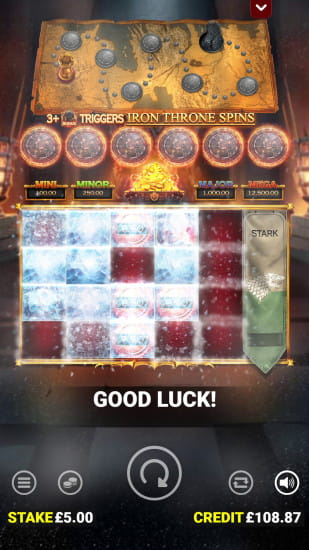
- Optimized touch controls. The Game of Thrones interface — the spin button, bet controls, the chest above the reels that signals Dragon Fire Modifiers, the map progression indicator on the left — is designed with touch interaction in mind. Casino apps typically render these controls with slightly better touch response than browser versions, which matters most during Iron Throne Spins when you are monitoring multiple active systems simultaneously.
- Stable sessions without browser interruption. Browser tabs can reload, sessions can time out, and switching apps accidentally can interrupt a bonus round at the worst possible moment. A native casino app maintains the session more reliably — particularly relevant for Iron Throne Spins rounds that can run for extended periods when Collect symbols are triggering extra spins and the x10 multiplier is active.
- Portrait mode optimization. Game of Thrones is confirmed compatible with portrait mode on mobile — meaning you can play one-handed on a smartphone without needing to rotate to landscape. Casino apps typically handle orientation switching more gracefully than browser versions for slots that support both orientations.
Browser vs App: Which is Better for Game of Thrones?
Both options deliver the full Game of Thrones: Seven Kingdoms experience — no features are exclusive to either. The difference comes down to convenience, session management, and how you prefer to play a game built around long-term progression. Here is a direct comparison across the factors that matter most for this specific title.
| Feature | Mobile browser | Casino app |
|---|---|---|
| Installation required | No | Yes — APK or PWA |
| Access speed | Medium — open browser, navigate to the site | Fast — one tap from the home screen |
| Full game features | Yes | Yes |
| Seven Kingdoms Map persistence | Yes | Yes |
| Session stability | Good | Very good |
| Push notifications | No | Yes |
| Biometric login | Limited | Yes — Touch ID / Face ID |
| Portrait mode support | Yes | Yes |
| Storage required | None | Minimal |
| Automatic updates | Yes | Sometimes manual |
| Privacy on device | No trace | App visible on device |
| Multi-device flexibility | High — any device with a browser | Device-specific |
When the browser is the better choice
The browser is the right option if you play across multiple devices and want to pick up your map progression from whichever screen is convenient — desktop at home, phone on the go, tablet in between. It is also the better choice if you are still evaluating which casino to commit to for your primary Game of Thrones sessions. Playing via browser leaves no trace on the device and requires zero setup — open, play, close.
For players in regions where the casino’s iOS app is not available in the local App Store, the browser is also the only option outside of the PWA route — and for most practical purposes, the Safari browser experience on iPhone is close enough to a native app that it rarely feels like a meaningful downgrade.
When the app is the better choice
The app becomes the clearly superior option once you have committed to a casino and are playing Game of Thrones regularly with the intention of building through the Seven Kingdoms Map. The combination of one-tap access, stable sessions, push notifications and biometric login removes every friction point from the short regular sessions that the game’s progression mechanic is designed to reward.
The Iron Throne Spins feature is also where the app’s session stability advantage is most tangible. A bonus round where multiple house Collects are active, extra spins are triggering, and the x10 multiplier is running is exactly the moment you do not want a browser tab to reload or a session timeout to interrupt. The app eliminates that risk.
The practical recommendation
Start with the browser. Evaluate a few casinos, find the one with the highest available RTP version of the game, and the bonus structure that suits your playing style. Once you have a clear preferred operator, install their app — the progression mechanic will make the investment worthwhile quickly.
Best Casino Apps for Game of Thrones: Seven Kingdoms
Game of Thrones: Seven Kingdoms is available across all major Blueprint Gaming partner casinos. The table below covers the leading operators where the game is confirmed available, with their mobile app offering, welcome bonus, and key payment methods. All operators listed hold licenses from recognized regulatory authorities across Blueprint’s supported jurisdictions.
| Casino | License | Welcome Bonus | Mobile App | Game of Thrones | Payment Methods |
|---|---|---|---|---|---|
| Bet365 | UK GC + MGA | Up to £100 in bet credits | iOS + Android | ✅ Available | Cards, PayPal, Skrill, Neteller, bank transfer |
| LeoVegas | UK GC + MGA | 100% up to £100 + 200 free spins | iOS + Android | ✅ Available | Cards, PayPal, Skrill, Neteller, Trustly |
| 888 Casino | UK GC + MGA | £20 no deposit + 100% up to £100 | iOS + Android | ✅ Available | Cards, PayPal, Skrill, Neteller, bank transfer |
| Betway | UK GC + MGA | 100% up to £250 | iOS + Android | ✅ Available | Cards, PayPal, Skrill, Neteller, Paysafecard |
| William Hill | UK GC + MGA | Up to £300 welcome offer | iOS + Android | ✅ Available | Cards, PayPal, Skrill, Neteller, bank transfer |
| Unibet | UK GC + MGA | £40 money back + £10 casino bonus | iOS + Android | ✅ Available | Cards, PayPal, Skrill, Neteller, Trustly |
| Mr Green | UK GC + MGA | 100% up to £100 + 200 free spins | iOS + Android | ✅ Available | Cards, PayPal, Skrill, Neteller, Trustly |
| NordicBet | Spillemyndigheden + MGA | 100% up to £100 | iOS + Android | ✅ Available | Cards, Trustly, Skrill, Neteller, bank transfer |
| Betsson | Spillemyndigheden + MGA | 100% up to £100 + 100 free spins | iOS + Android | ✅ Available | Cards, Trustly, Skrill, Neteller, PayPal |
| Bwin | UK GC + MGA | £20 free bets + 100% up to £200 | iOS + Android | ✅ Available | Cards, PayPal, Skrill, Neteller, Paysafecard |
| PokerStars Casino | UK GC + MGA | 100% up to £200 + 200 free spins | iOS + Android | ✅ Available | Cards, PayPal, Skrill, Neteller, bank transfer |
A note on RTP versions. Game of Thrones: Seven Kingdoms is available in 92%, 93% and 94% RTP configurations — the active version is set by the operator. Before committing to a casino specifically for this title, check the game information panel to confirm which RTP version is active. The difference is meaningful over extended sessions and particularly relevant for a game built around long-term map progression.
A note on App Store availability. iOS app availability varies by region for some operators. If your chosen casino does not have an App Store listing in your country, the PWA route via Safari delivers a functionally equivalent experience. All operators in this table support full mobile browser play as a fallback.
Conclusion
Game of Thrones: Seven Kingdoms is one of the best Blueprint Gaming titles to play on mobile — not despite its complexity but because of it. The Seven Kingdoms Map progression mechanic is specifically designed for the kind of short, regular sessions that mobile play naturally encourages. A five-minute session on the commute that advances the map by ten steps is not a wasted session — it is groundwork for a more powerful Iron Throne Spins trigger the next time you sit down properly.
The HTML5 foundation means the full game runs on any modern smartphone or tablet without compromise. Dragon Fire Modifiers, all five house Collect features, the complete Iron Throne Spins experience with multipliers and extra spins — everything available on desktop is available on mobile. There is no stripped-down version, no features held back for larger screens.
For the Game of Thrones app specifically, there is no standalone download for the slot itself. Access comes through the casino apps of the operators that carry Blueprint Gaming’s catalog. All eleven casinos in our table above offer strong mobile platforms on both iOS and Android, with the highest RTP version of the game worth confirming before you commit to a particular operator.
The practical recommendation is straightforward — start with the browser to evaluate your preferred casino, then install their app once you have committed to a platform for your map progression sessions. The combination of one-tap access, session stability, and push notifications makes the app the clearly superior choice for regular play on a game built around long-term progression.
Frequently Asked Questions
Is there a Game of Thrones slot app to download?
There is no standalone Game of Thrones slot app available as an independent download for Android or iOS. The game is developed by Blueprint Gaming and is accessed through the mobile apps and browser platforms of the online casinos that carry their catalog. Download your chosen casino’s app and find Game of Thrones in the lobby — all major Blueprint partner casinos carry the title.
How do I get the Game of Thrones app on Android?
Download the APK file directly from your chosen casino’s website — the game is not available as a standalone download on Google Play. Enable installation from unknown sources in your Android security settings, install the APK and find Game of Thrones in the casino lobby. Alternatively play directly in your mobile browser without any download required.
Can I play Game of Thrones on iPhone?
Yes. Game of Thrones runs fully in Safari on iPhone and iPad. If your chosen casino has an iOS app available in your region download it from the App Store. If not, use Safari to navigate to the casino website and add it to your home screen via the Share menu — selecting Add to Home Screen creates a PWA shortcut that opens full screen like a native app.
Does the mobile version have all the same features as desktop?
Yes. Game of Thrones: Seven Kingdoms is built in HTML5 with full feature parity across all platforms. All five house Collect features, Dragon Fire Modifiers, the Seven Kingdoms Map progression, Iron Throne Spins with multipliers and extra spins — everything available on desktop runs identically on mobile.
Does my Seven Kingdoms Map progress save on mobile?
Yes. The Seven Kingdoms Map progress is tied to your casino account rather than your device. Your map position saves between sessions and carries over whether you play on mobile, tablet or desktop — as long as you are logged into the same account at the same casino.
Which casino has the best app for Game of Thrones?
Bet365, LeoVegas and William Hill consistently rank among the strongest mobile casino apps for Blueprint Gaming titles. All three offer fully featured iOS and Android apps with stable performance and the complete Blueprint catalog. Check which RTP version of Game of Thrones each operator has active before committing — the difference between 92% and 94% is meaningful over extended sessions.
What are the minimum requirements to play Game of Thrones on mobile?
For Android you need Android 7.0 or higher with at least 2 GB RAM and a modern browser like Chrome 80+. For iOS you need iOS 13.0 or higher on an iPhone 6s or later. A stable 4G or WiFi connection is recommended — particularly during Iron Throne Spins when multiple bonus systems are active simultaneously.